

 Payroll Management
 HR Support
 Time & Attendance
 Benefits
 Hiring & Onboarding
 Solution Add Ons
 Horizon Payroll Solutions
Tracking employee hours is relatively straightforward when everyone reports to the same workplace every day. It becomes more complicated when your employees are spread across multiple offices, stores, restaurants, healthcare facilities, job sites, or other locations.
Some employees may work at one location every day, while others rotate between several locations during the week. An employee might even work at two or more locations during the same shift. Employers need a reliable way to capture all of those hours and bring them together for payroll.
A centralized time and attendance system can make the process much easier. It gives employees a consistent way to record their time while providing managers with better visibility into hours, schedules, overtime, and labor costs across the business.
Why Multi-Location Employee Time Tracking Can Be Difficult
Adding locations can create additional layers of complexity for payroll and workforce management. Imagine a business with five locations. Each location has its own manager, schedule, and employees. Some employees occasionally fill shifts at another location. If every manager maintains separate timecards or spreadsheets, someone eventually has to combine all of that information before payroll can be processed.
The process becomes even more complicated when employees regularly move between locations, departments, or jobs. Inconsistent timekeeping can also make it harder to answer basic questions. How many hours did an employee work this week? Where were those hours worked? Is the employee approaching overtime? How much labor did each location use?
A good multi-location timekeeping process should make those answers easy to find.
Common Ways Businesses Track Hours Across Multiple Locations
Businesses have several options for tracking employee time, paper time sheets, digital spreadsheets, physical time clocks, but the best solution is often cloud-based time and attendance software.
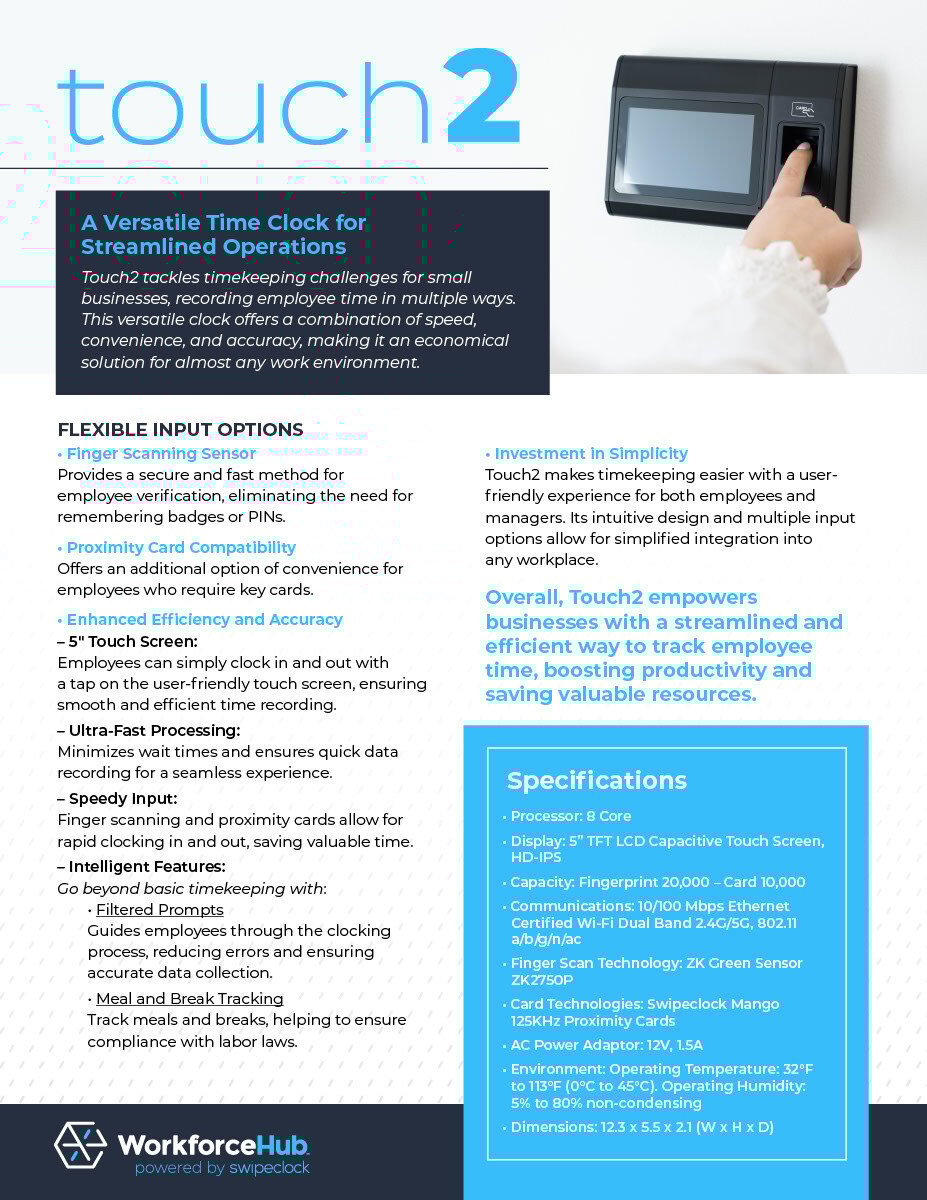
With a cloud-based time and attendance software, employees can record their time through approved devices or mobile solutions, while managers can access timekeeping information through a centralized system. Horizon's timekeeping solution, SwipeClock, includes multiple timekeeping device options and allows employees to clock in from multiple locations.
How to Track Employee Hours Across Multiple Locations
Businesses can simplify multi-location timekeeping by establishing one process that follows employees wherever they work.
1. Establish a Consistent Timekeeping Policy
Start by deciding how employees are expected to record their time. Your policy should explain when employees clock in and out, how meal periods are recorded, what happens when someone forgets to clock in, and how corrections are submitted. Employees should also know what to do when they work at a different location or move between locations during the workday.
Managers need clear procedures as well. Determine who reviews timecards, who can make corrections, and when approvals must be completed before payroll. Consistency becomes increasingly important as a company adds locations. Employees should not have to learn an entirely different timekeeping process every time they work somewhere else.
2. Use a Centralized Time and Attendance System
A centralized system gives the business one place to manage employee hours. Instead of Location A maintaining one spreadsheet and Location B maintaining another, employee time can flow into the same system. Managers can review records for the employees and locations they oversee, while payroll staff can access the information they need for processing.
Centralization is particularly useful for employees who regularly work at different locations. Their hours can remain connected to the same employee record rather than becoming fragmented across several independent systems.
3. Assign Hours to the Correct Location, Department, or Job
Knowing that an employee worked eight hours is important for payroll. Knowing where those eight hours were worked can also provide valuable information for managing the business. Depending on the organization, employers may want to categorize time by location, department, position, client, or job.
For example, an employee could work four hours at one restaurant and four hours at another. A construction employee could spend the morning at one project and the afternoon at another. Recording those distinctions gives managers a clearer picture of where labor is being used. It can also make it easier to evaluate staffing and labor costs across different parts of the organization.
4. Give Employees Convenient Ways to Clock In and Out
A timekeeping system has to work where your employees work. Employees at a permanent workplace may use a physical time clock or kiosk. Employees who regularly move between locations may need access through a mobile device or another web-based option.
Horizon offers multiple timekeeping options, including physical devices, WebClock, and mobile solutions. Its timekeeping platform is designed to support employees clocking in from multiple locations. The goal is to create a convenient and consistent process without forcing managers to manually reconstruct employee hours at the end of each pay period.
5. Track Employees Who Move Between Locations
Some employees may start and finish their day at the same workplace. Others may move between stores, offices, customers, or job sites. Your timekeeping process should account for these movements.
When appropriate, employees may need to change the location, job, or department associated with their time while remaining clocked in for the workday. This can help the employer determine how much labor was used at each location while maintaining an accurate record of the employee's total hours.
Employers should also pay attention to travel between work locations. Under federal wage-and-hour guidance, travel from job site to job site during an employee's workday generally counts as hours worked. Ordinary home-to-work commuting is generally treated differently.
Because specific circumstances can affect whether travel time is compensable, employers should review applicable federal, state, and local requirements.
6. Monitor Total Hours and Overtime
One of the biggest mistakes a multi-location employer can make is looking at an employee's hours at each location without considering the employee's overall workweek. Suppose an employee works 25 hours at one location and another 20 hours elsewhere within the same workweek for the same employer. The employer needs visibility into the employee's combined hours, rather than treating the two sets of hours as unrelated records.
A centralized system can make it easier for managers to see total hours and identify employees approaching overtime. The U.S. Department of Labor requires covered employers to maintain certain records for covered, nonexempt employees, including hours worked each day and total hours worked each workweek. Businesses should review applicable wage-and-hour rules when determining overtime because federal, state, and local requirements can vary.
7. Create a Timecard Review and Approval Process
Even a good timekeeping system requires oversight. Managers should review employee timecards for missing punches, unusually long shifts, incorrect location assignments, and other potential issues before approving them for payroll.
Create a standard approval deadline for every location. For example, managers might be required to review all timecards by a certain day and time following the end of the pay period. Establish a process for corrections as well. Employees should know how to report a missed punch or inaccurate entry, and managers should know how corrections should be documented.
Catching problems before payroll is processed can save time for both employees and payroll staff.
8. Integrate Time Tracking With Payroll
Timekeeping and payroll are closely connected. Making the two systems work together can reduce duplicate work. Without integration, someone may have to take approved hours from the timekeeping system and manually enter them into payroll. The more employees and locations involved, the more information there is to transfer.
Integrated systems allow approved timekeeping information to flow into the payroll process. Horizon's Time & Attendance solutions are designed to integrate with payroll software, helping businesses reduce manual effort and streamline payroll processing.
What to Look for in Multi-Location Time Tracking Software
Every business operates differently, so timekeeping software should fit the way your employees actually work. For a business managing employees across multiple workplaces, useful capabilities may include:
- Centralized employee time records
- Mobile and web-based clock-in options
- Multiple timekeeping device options
- Location, department, or job tracking
- Employee scheduling
- PTO and attendance management
- Overtime visibility
- Manager approval workflows
- Payroll integration
- Labor and timekeeping reports
Think about future growth as well. A system that works for three locations should ideally still be practical if the company eventually expands to 10 or 20.
Common Multi-Location Time Tracking Mistakes
Problems often develop when businesses grow faster than their timekeeping processes. One common mistake is allowing every location to develop its own system. One manager uses spreadsheets, another keeps paper records, and another sends payroll information through email. Consolidating those records can become unnecessarily difficult.
Other common problems include employees forgetting to change locations or jobs, managers waiting until payroll day to review timecards, and businesses failing to look at an employee's total hours across locations. Manual data entry can create another opportunity for mistakes. The more information payroll staff must re-enter, the more opportunities there are for incorrect hours or other errors.
Standardizing the process can make multi-location timekeeping easier for employees, managers, and payroll teams.
Employee Time Tracking and Labor Law Compliance
Accurate timekeeping is also an important part of wage-and-hour compliance. Under the Fair Labor Standards Act (FLSA), covered employers must maintain specified wage and hour records for covered, nonexempt employees. These include hours worked each day and total hours worked each workweek. Federal rules do not require employers to use a particular timekeeping format or a time clock, but required records must be accurate.
Employers operating across multiple states or municipalities may have additional requirements to consider. Rules involving overtime, meal and rest periods, predictive scheduling, travel time, and other employment matters can differ by jurisdiction. Businesses should review the requirements that apply to each location and seek qualified HR or legal guidance when necessary.
Simplify Multi-Location Time Tracking With Horizon Payroll Solutions
Managing employees across multiple locations does not mean payroll has to become a collection of spreadsheets, paper timecards, and emails from different managers.
Horizon Payroll Solutions offers Time & Attendance solutions designed to help businesses track employee hours, attendance, PTO, and schedules. Employees can clock in using several available timekeeping options, including solutions designed for employees working from multiple locations. Timekeeping information can also integrate with payroll, reducing the need for repetitive manual entry.
Horizon combines these tools with payroll management and other workforce solutions, giving employers a more connected way to manage their employees. Learn more about Horizon's Time & Attendance solutions or contact Horizon Payroll Solutions to discuss a timekeeping setup that fits your workforce.
Make Multi-Location Timekeeping Easier
As a business grows, its timekeeping process needs to grow with it. A system that works for a single office may become difficult to manage once employees begin working across multiple stores, facilities, or job sites. Centralizing employee time, establishing consistent policies, monitoring total hours, and connecting timekeeping with payroll can make the process easier to manage.
Horizon Payroll Solutions provides payroll and Time & Attendance solutions for businesses that want to spend less time managing administrative tasks and more time running their organizations. Explore Horizon Payroll Solutions to learn more about payroll, timekeeping, HR, benefits, and workforce management solutions.
This content is for general information purposes and does not constitute tax or legal advice, nor does it address federal, state, or local law. Employers should consult qualified legal and tax counsel regarding their specific obligations.